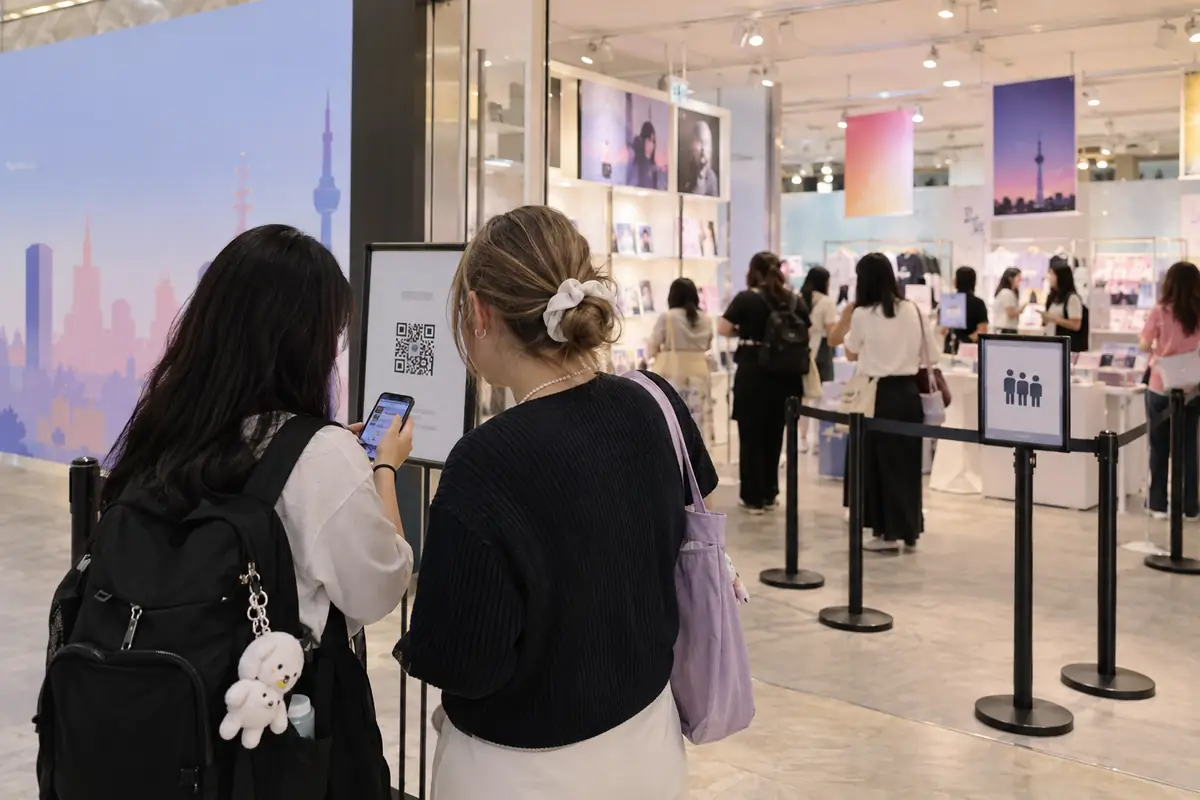
You find a pop-up announcement at night, translate the poster and tap the reservation link. Then the easy-looking plan turns into three different questions: Does the form accept your account? Will a screenshot of the QR code work? If the reservation is full, can you simply queue outside?
K-pop pop-up stores in Korea are temporary shops, so there is no single entry system. One event may use Weverse and accept walk-ins; another may use a verified NAVER account, compare the reservation name with a passport and close its on-site waitlist before lunch. The useful skill is not memorizing one shop’s rules. It is learning how to read each notice before you travel across Seoul.
Information checked on September 17, 2026. Event rules, stock and reservation platforms change quickly; the official notice for your exact pop-up always takes priority.
Before joining a queue: Check the live reservation screen, entry window and ID rules before joining a K-pop pop-up queue.
1. Start with the official notice, not a reposted poster
A social-media graphic is useful for discovering an event, but it often leaves out the conditions that decide whether you can enter. Find the artist, agency, official store or event operator’s full notice and save the direct link. Then record six items in your phone:
- event dates and daily opening hours;
- the exact building, floor and entrance;
- reservation opening time in Korea Standard Time;
- whether entry is advance reservation, on-site queue or both;
- the accepted reservation screen and identification;
- the final time for joining the queue or entering the store.
Do not assume that a translated fan post is current. Pop-ups can add walk-in periods, change queue locations or stop admitting visitors when the building becomes crowded. Check the original notice again on the morning of your visit and look for an update on the operator’s official social account.
2. Identify the reservation system before trying to book
For K-pop pop-up stores in Korea, the first screen tells you what kind of obstacle you are dealing with. A Weverse reservation, a NAVER Booking page and an on-site queue are not interchangeable.
| System | What to prepare | Common failure |
|---|---|---|
| Weverse or Weverse Spot | The correct account, updated app and access to the live reservation page | Logging into a different account or relying on a saved QR image |
| NAVER Booking | An eligible account in the visitor’s name and the original ID specified in the notice | Reservation name and passport name do not match |
| On-site digital queue | A working notification route, usually KakaoTalk, email or a number accepted by that system | Missing the entry alert or returning after the short grace period |
| Walk-in line | The correct entrance, opening time and realistic backup plan | Assuming walk-ins are guaranteed because they were allowed on another day |
For example, one 2026 Weverse reservation guide required each visitor to use an individual account and did not allow accompanying guests under one booking. A separate Seoul pop-up notice using NAVER Booking required the reservation to be made in the visitor’s name and checked the mobile ticket against physical identification. These are examples of different systems, not universal rules.
3. Read the account requirement literally
A contact field, a notification method and a real-name account check are different requirements. Do not assume that entering any Korean-format number makes a NAVER reservation eligible, or that successful account registration guarantees the booking will pass an on-site name check. Read the labels and the event notice together.
If the page asks for a service you cannot complete, do not enter a stranger’s identity details or buy a “verified” account. A reservation tied to another person may fail at the door, and that person may retain control of it. Ask the named organizer whether an email, Weverse or on-site route exists and keep a different activity ready.
This article does not repeat connectivity advice. For the differences between data-only service, local numbers, tourist SIMs and pocket Wi-Fi, use our South Korea SIM, eSIM and pocket Wi-Fi comparison. Whatever connection you choose, it cannot override the pop-up’s account and identity rules.
4. Keep the live QR page available at the entrance
At K-pop pop-up stores in Korea, a screenshot is convenient when mobile data is weak, but several official notices explicitly reject captured or shared reservation images. Staff may need to see the live page inside the logged-in app or website. A screenshot can also hide whether a ticket has already been used.
Before leaving your hotel:
- update the required app;
- log into the same account used for booking;
- open the reservation history and locate the QR icon;
- charge your phone and carry a small battery;
- confirm that mobile data works away from Wi-Fi;
- save the confirmation email as a backup, while remembering it may not replace the live ticket.
Do not tap a button marked “used,” “complete” or “for staff” while testing the screen. One official Seoul notice warns that activating the employee-only completion control before entry can make the mobile ticket unusable.
5. Arrive for the correct window—not simply as early as possible
Some K-pop pop-up stores in Korea ask reserved visitors to arrive 10 or 20 minutes before their session. Others allow entry at any time within the booked block but still require everyone to leave when that block ends. Arriving late can therefore reduce shopping time even when staff still admit you.
On-site queues work differently. You may register near the entrance, leave the immediate area and receive a KakaoTalk or email alert later. The return window can be short: recent official examples allowed only 10 or 15 minutes after the call before automatic cancellation. Keep notification sound on, avoid starting a long meal and check whether the alert went to spam.
Do not camp overnight unless the organizer specifically permits it. Some notices explicitly prohibit overnight waiting and may disperse lines for safety. A queue visible in the morning also does not guarantee that registration is still open.
6. Separate entry success from merchandise success
At K-pop pop-up stores in Korea, a confirmed reservation gives you a chance to enter during a defined period. It does not reserve albums, character goods, photocards or purchase benefits. Limited products may sell out early, and organizers may set a daily quantity or a per-person limit.
Make a short priority list before you enter:
- one item you would regret missing;
- one acceptable alternative;
- your maximum total budget;
- whether a purchase benefit requires one receipt or a minimum amount;
- which products must be checked for defects immediately.
Do not split or combine receipts to chase a benefit unless the official rules allow it. Some events calculate rewards from one same-day receipt and refuse receipt manipulation. Random benefits may not be exchangeable simply because you received a different member.
Payment also varies. An official Seoul notice accepted Korean won cash and several card or mobile-payment methods but warned that some cards could still be declined. Carry a second eligible payment method if possible. Our foreign-card troubleshooting guide explains what to do when a card fails in Korea; it cannot override a pop-up’s payment policy.
7. Inspect every purchase before leaving
K-pop pop-up stores in Korea are temporary shops that disappear. That makes a missing component or damaged item harder to solve than the same problem at a permanent store. Count your items and inspect packaging, printed goods and inclusions with staff before walking out.
Exchange policies are event-specific. One official pop-up allowed certain returns within 14 days, while another limited defect handling to the operating period and required the physical receipt, original payment method and related freebies. “I am flying home tomorrow” does not create an exception.
Keep the receipt flat and photograph it for your records, but retain the physical copy when the notice requires it. If you receive a purchase benefit, keep it with the item in case a refund requires everything to be returned. Ask about tax-free processing before paying; not every temporary shop offers it.
A practical plan when the reservation route is blocked
When K-pop pop-up stores in Korea use a booking page with verification you cannot complete, stop before experimenting with borrowed accounts. Work through this order instead:
- read the complete official notice for a foreigner, email or walk-in route;
- check whether on-site registration begins on a later date;
- contact the named organizer with the event date and a short, specific question;
- monitor official cancellations without paying an unofficial reseller;
- visit only if the published walk-in rules make the journey reasonable;
- use a nearby permanent album shop, exhibition or neighborhood stop as your backup.
This approach is less exciting than a “reservation hack,” but it protects both your time and your account. Staff at the entrance can sometimes explain the current queue, yet they cannot rewrite a real-name booking rule or restore merchandise that has sold out.
Ten-minute checklist for K-pop pop-up stores in Korea
- Official notice and any same-day update opened
- Correct address, floor and entrance saved in Korean
- Reservation account and visitor name checked
- Accepted original ID packed
- Live QR page accessible while logged in
- Phone charged, mobile data working and notifications enabled
- Arrival and return-notification windows understood
- Priority items, purchase limits and benefit conditions noted
- Backup payment method and budget ready
- Alternative activity saved in case entry or stock is unavailable
For K-pop pop-up stores in Korea, the best visit is not necessarily the one with the largest shopping bag. It is the one where you understand the queue, enter with the right screen and identification, buy within your budget and leave without discovering a damaged item on the flight home.
Related K-pop planning
Pop-up reservations are separate from performance entry. If your trip also includes a live event, use our guides to K-pop concert ticket checks and K-pop music show attendance rules. Do not copy a pop-up’s QR, identity or queue assumptions into either process.
Sources and research note
- Weverse: 2026 CUTIE STREET POPUP in Korea reservation guide
- Weverse: HOLIDAY HOUSE pop-up in Seoul detailed information
- Weverse: 2026 N:DVERSE GARDENING pop-up notice
- Reddit community discussion: reservation limits without a Korean number
Official notices support the entry, identification, queue, purchase and exchange examples. Community discussions were used only to identify recurring traveler questions; they are not treated as official policy. This article does not list live inventory or promise admission.